M
If you’re looking to customize your League of Legends experience with unique, fan-made skins, Mod Skin LOL 13.4 is the perfect tool for the job. This third-party application allows you to apply custom skins to your champions that aren’t available in the official game. In this guide, we’ll walk you through the steps of installing Mod Skin LOL 13.4 on your PC so you can start enjoying the wide range of custom skins available.
What Is Mod Skin LOL 13.4?
Mod Skin LOL 13.4 is a lightweight, third-party tool designed for League of Legends players who want to use custom skins. Unlike official skins, Mod Skin LOL gives you the ability to change the visual appearance of your champions with skins created by the community. This tool is compatible with Windows 7, 8.1, and 10 and has a small file size of just 2.28 MB, making it easy to install and use without affecting system performance.
Although Mod Skin LOL doesn’t impact gameplay or provide any in-game advantages, it is important to note that using third-party tools to modify game files may violate Riot Games’ Terms of Service, and can result in penalties, including bans. Therefore, it’s essential to use the tool responsibly.
Step-by-Step Guide to Install Mod Skin LOL 13.4
Follow these simple steps to install Mod Skin LOL 13.4 on your PC:
Download the Mod Skin LOL 13.4 Tool:
The first step is to download the Mod Skin LOL 13.4 tool from a trusted source. Make sure you’re getting the tool from a reliable website to avoid any potential security risks such as malware.
Tip: Be cautious of websites offering downloads for free, as they may not be secure. Always download from trusted sources like the official Mod Skin LOL website or well-known gaming forums.
Extract the Files:
Once you’ve downloaded the Mod Skin LOL 13.4 tool, it will likely be in a ZIP format. To extract the files, follow these steps:
Right-click on the downloaded ZIP file.
Select Extract All and choose a location on your computer where you want the files to be saved.
Click Extract to unpack the files.
Run the Mod Skin LOL 13.4 Tool as Administrator:
After extracting the files, locate the Mod Skin LOL 13.4 executable file (usually named something like LOLSKIN.exe) in the folder you just extracted.
Right-click on the executable file.
Select Run as Administrator to ensure that the tool runs with the proper permissions on your system.
Select the League of Legends Client:
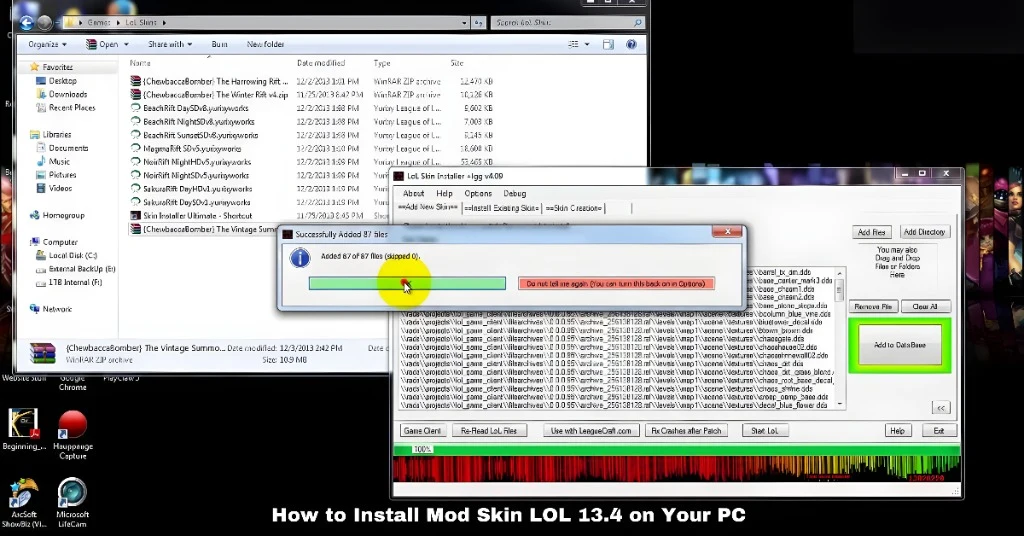
Once the Mod Skin LOL program is running, it will prompt you to select the League of Legends client that you want to modify. The program should automatically detect your League of Legends installation, but if it doesn’t, you can manually browse to the directory where League of Legends is installed on your PC (typically C:\Riot Games\League of Legends).
Choose Your Champion and Custom Skin:
With Mod Skin LOL 13.4 running, you can now choose the champion whose skin you want to change. Here’s how to apply a custom skin:
In the Mod Skin LOL interface, browse through the available skins. You’ll see various skins for different champions, ranging from simple recolors to more elaborate fan-made designs.
Select the champion you want to customize.
Choose your desired custom skin from the list.
Click the Apply button to apply the skin to your selected champion.
Tips for Using Mod Skin LOL 13.4
To make your experience with Mod Skin LOL even smoother, here are a few tips:
Backup Your Game Files: Before making any changes, it’s a good idea to backup your League of Legends game files. If something goes wrong or you want to revert to the original skins, you can restore your backup.
Don’t Use Mod Skin LOL in Ranked Matches: Although custom skins don’t affect gameplay, using third-party tools in ranked matches increases the risk of detection by Riot’s anti-cheat system. It’s best to use Mod Skin LOL in normal or ARAM matches to avoid penalties.
Stay Up-to-Date: Mod Skin LOL updates regularly to maintain compatibility with the latest League of Legends patches. Make sure you download and install any updates to ensure smooth operation.
Use a Smurf Account: If you’re worried about getting banned, consider using Mod Skin LOL on a smurf account (a secondary account). This way, you can experiment with custom skins without risking your main account.
Risks of Using Mod Skin LOL
While Mod Skin LOL can provide a fun, customized gaming experience, there are risks involved. It’s important to understand these before you start using the tool:
Violation of Riot’s Terms of Service: As Mod Skin LOL is a third-party tool that modifies game files, using it can violate Riot Games’ Terms of Service. This can lead to account penalties or even permanent bans.
Game Instability: Custom skins might not always be compatible with new updates, causing crashes, bugs, or other issues with the game. Always make sure you’re using the latest version of Mod Skin LOL.
Security Concerns: Downloading the tool from untrusted or unofficial sources can expose your PC to malware or viruses. Always get Mod Skin LOL from a reputable source to keep your computer safe.
FAQs
Final Words
Installing Mod Skin LOL 13.4 is a simple way to enhance your League of Legends experience with custom skins. However, it’s important to be aware of the potential risks, such as account penalties and game instability, when using third-party tools. By following the steps and tips provided in this guide, you can safely install and use Mod Skin LOL without putting your account in jeopardy.